

CapCut Pro is the paid upgrade version of CapCut, unlocking more features such as premium effects, filters, fonts, transitions, and export options. Some users, after subscribing to CapCut Pro to meet their advanced editing needs, no longer require its advanced functions and want to save money, or they accidentally subscribed to the service. As long as you use the platform where you registered, unsubscribing is very simple. This guide will introduce: the official pricing of CapCut Pro, step-by-step cancellation procedures applicable to all devices, how to stop automatic renewal, the rights after cancellation, and even alternatives to CapCut Pro.
Official Pricing of CapCut Pro
CapCut Pro operates on a subscription model, with prices varying by region, device, and taxes. Here is a price overview:
1. Standard Edition
Only supports mobile devices (iOS/Android), with a monthly fee of $9.99 and an annual fee of $89.99. Includes basic premium tools, no watermark, and mobile-exclusive effects.
2. Pro Edition
Supports mobile, desktop, and web, with a monthly fee of $19.99 and an annual fee of $179.99. Supports 4K/HDR export, advanced AI tools, cloud storage, and cross-platform sync.
Prices may vary by region. The annual Professional Edition/Standard Edition package includes a 7-day free trial period. Unless cancelled before the trial period ends, it will automatically convert to a paid version.
How to Cancel CapCut Pro on Android Devices
Most Android users subscribe through the Google Play service. Here’s how to cancel the subscription:
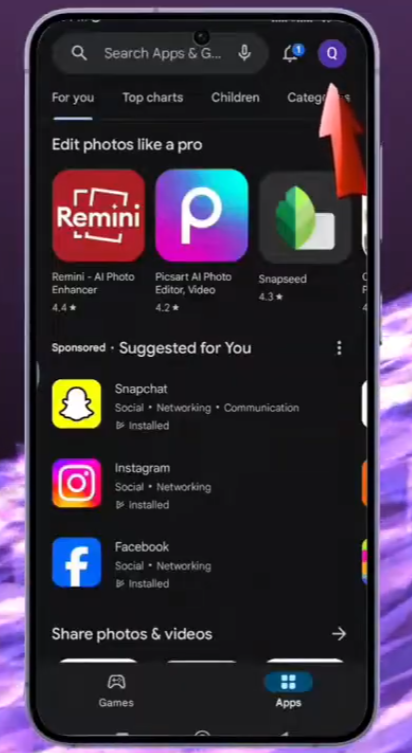
1. Open the Google Play Store app on your Android device.
2. Click on your profile icon to open the menu.
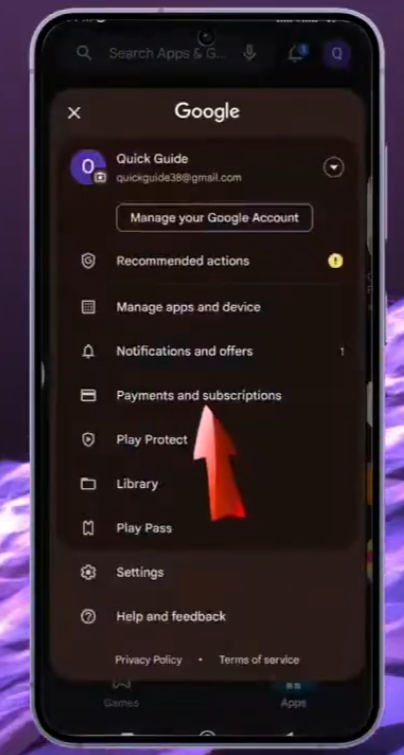
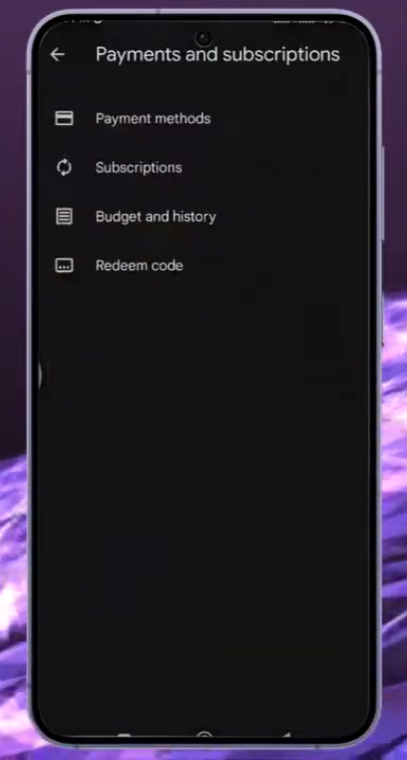
3. Select “Payments and Subscriptions” then select “Subscriptions”.
4. Browse your active subscriptions and click on CapCut Pro.
5. Click “Cancel Subscription”.
6. Follow the screen prompts to confirm.
How to Cancel CapCut Pro on iOS Devices
For iPhone and iPad users, CapCut Pro subscriptions are managed through the Apple ID.
- Open the “Settings” app on your iPhone/iPad.
- Click on your Apple ID.
- Select “Subscriptions”.
- Find CapCut Pro in the list of valid subscriptions.
- Click “Cancel Subscription”.
- Confirm your choice.
How to Turn Off Auto-Renewal to Avoid Future Charges
Cancelling the CapCut Pro subscription will automatically disable the automatic renewal. To avoid unexpected deductions:
- Deleting CapCut Pro will not cancel the subscription.
- Please cancel the subscription at least 24 hours before the next renewal date to avoid being charged for the next period.
- After cancellation, please check the emails from Google, Apple, or Capcut to confirm that the automatic renewal has been cancelled.
Important Reminders Before Cancelling CapCut Pro
Before cancellation, users should be aware of the following:
- Confirm the subscription platform: If “no valid subscription” is shown but you are still being charged, it may be due to using the wrong platform. Please check the previous emails to find the payment provider.
- Back up projects: After cancelling the subscription, advanced effects and materials may be locked. Please back up and save important projects first.
- Save receipts: If you need to dispute unexpected charges, keep the cancellation email and past subscription data for reference.
What Happens to Remaining Benefits After Cancellation
Cancelling the subscription will not immediately terminate your access to the Professional version. Users can continue to use the Pro features until the end of the current billing cycle.
After expiration: The account will revert to the free version. You can still view and export project files, but you will not be able to use the professional tools in the new editor.
How to Restore Mistakenly Cancelled CapCut Pro
If you accidentally cancel the subscription, it’s very simple to restore it as long as the subscription period has not yet expired.
Restore options:
- Re-subscribe to CapCut Pro through the same app store
- Restore purchased items using the same Apple ID (iOS).
- Make sure you have logged in to the original account used for the purchase.
- The time you paid for cannot be restored once it has completely expired, but re-subscribing can immediately restore the access to the Professional version.
Alternative to CapCut Pro: CapCut Mod APK
For users who want to use the professional features but don’t want to subscribe, they can consider Download CapCut Mod APK.
The CapCut Mod for PC version usually offers:
Unlocking advanced effects
No subscription prompts.
No need to pay regularly to use the professional features.


