
Music plays an important role in video editing. Excellent background music can not only create the atmosphere of a video and enhance the impact of key moments, but also effectively retain the audience’s attention. Whether you’re creating short videos for social media, travel videos, product showcases, or personal vlogs, choosing the right music can significantly enhance the overall quality of your content. For creators who need more flexibility when preparing audio materials, using tools like capcut download mp3 can help access suitable music files and make it easier to match the right sound with different video styles and scenes.
CapCut offers a wealth of built-in music, sound effects, and editing tools, making it easier and more convenient to match audio with video footage.
However, simply adding one popular song is often not enough. The best music selection depends on the style, rhythm, message, and target audience of the video.
In the previous article, we discussed ways to only edit audio pitch in CapCut. This guide will show you how to choose suitable music for your CapCut videos and how to use music effectively during the editing process.
Why Music Matters in CapCut Videos
A video lacking suitable background music may appear monotonous and empty, while appropriate background music can enhance the appeal of the content and help establish an emotional connection between the video and the audience.
For example, slow-paced travel videos are better paired with soft and tranquil music, while fast-paced game clips may need energetic music to create the right atmosphere. In addition, the rhythm of the music can also affect viewers’ perception of the video’s speed and style.
Music can help with several parts of video creation:
- Setting the mood: Different music styles create different feelings, such as happiness, excitement, relaxation, or nostalgia.
- Supporting the story: Music can highlight important scenes and guide viewers through the video.
- Improving viewer attention: A well-matched soundtrack can make videos more enjoyable to watch.
- Creating a consistent style: The right music helps build a unique look and feel for your content.
Understand Your Video Style Before Choosing Music
Before searching for music in CapCut, consider the type of video you want to make and choose a soundtrack that matches its purpose and style. If you are editing on a computer, tools like CapCut Pro for Mac free download can also help you explore more editing options and create videos with better audio effects.
Travel Videos
Travel videos typically focus on memories, places, and experiences. Upbeat, cheerful, or cinematic music often works very well because it matches the atmosphere of exploring new places.
For videos showcasing natural scenery, beaches, or tranquil moments, slower-paced music with simple melodies can create a peaceful atmosphere.
Vlog Videos
Daily vlogs usually require music that sounds natural and has a soothing rhythm. A steady, rhythmic background music is a good choice because it can enhance the atmosphere of the video without being distracting or overpowering the content.
Product Videos
The music used in the product content needs to match the brand image. Simple, modern sound effects are typically suitable for technology products, while warm, inviting music may be more appropriate for lifestyle products.
Gaming Videos
Game editing typically requires stronger beats and faster tempos. Energetic music can perfectly complement action scenes, highlight reels, and thrilling moments.
Short Social Media Videos
Short videos need music that can quickly grab attention. Popular styles, catchy rhythms, and clear beat variations can make short videos more appealing.
Match Music With the Mood of Your Video
One of the most important parts of choosing music is matching the emotion of the video.
Here are some common matches:
| Video Mood | Suitable Music Style |
| Happy and fun | Upbeat pop, light electronic music |
| Relaxing | Soft piano, acoustic music |
| Adventure | Cinematic, inspiring music |
| Emotional | Slow melodies, gentle instrumentals |
| Modern and stylish | Electronic, minimal beats |
| Funny content | Playful and creative sounds |
The goal is not to choose the loudest or most popular song. The goal is to find music that fits the story you want to tell.
Pay Attention to the Video Speed and Music Rhythm
The rhythm of the music should match the editing speed of the video.
Fast cuts and action scenes are usually better suited to faster-paced music. If a video contains a lot of transitions, using music with a strong beat can make these transitions sound smoother.
When the video speed matches the rhythm of the music, the final product will have a more professional feel.
Consider the Length of Your Video
Video length also affects music selection.
For short videos, choose music that can quickly create a strong effect. The first few seconds of a video are crucial, so choosing a catchy, upbeat piece of music to start can help grab the viewer’s attention.
For longer videos, choose tracks with sufficient variation in melody or rhythm to avoid making the video appear monotonous and repetitive. In addition, you can combine different music clips or adjust the volume at different points.
CapCut allows users to edit music, adjust timing, and match audio clips with specific visuals.
Choose Between Songs and Instrumental Music
Both songs and instrumental tracks can work well, but they create different effects.
Songs With Lyrics
Music with lyrics can add personality and emotional depth, especially when the lyrics match the theme of the video.
For example, when creating a video that records personal memories, adding a meaningful song can often enhance its emotional impact.
However, lyrics can sometimes interfere with spoken content such as narration or explanation.
Instrumental Music
For tutorials, reviews, and narrative videos, instrumental music is usually a better choice. Without the distraction of lyrics, viewers can focus more on the visual content.
Use CapCut’s Music Library Effectively
CapCut offers a vast library of music and sound effects resources, helping creators quickly find suitable audio.
When searching for music, try using different keywords depending on the style of the video; instead of searching for specific songs, try searching by mood or theme.
Useful search ideas include:
- Happy
- Travel
- Chill
- Cinematic
- Pop
- Relaxing
- Dynamic
- Vlog
- Fashion
- Lifestyle
Listening to several options before choosing helps you find a track that matches your video better.
How to add music to CapCut
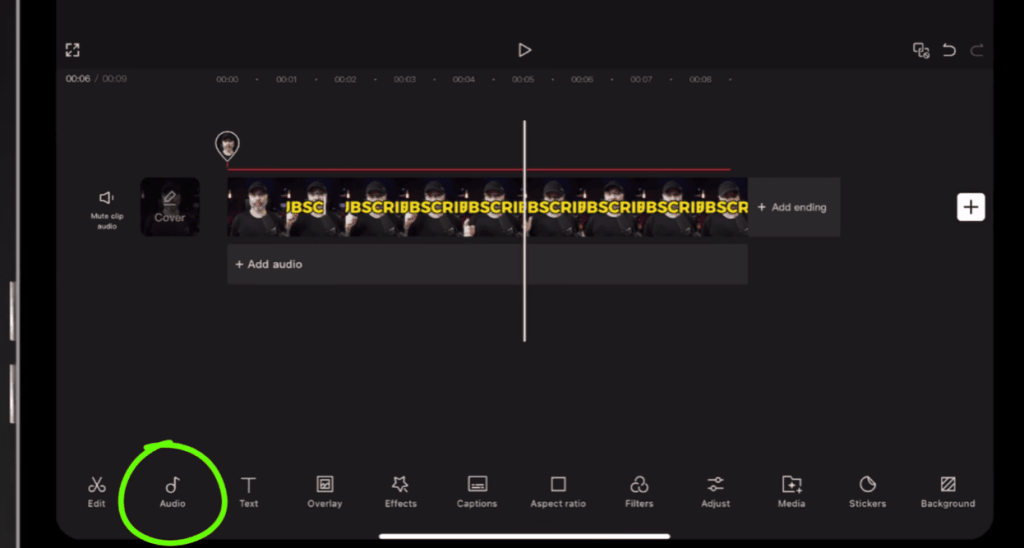
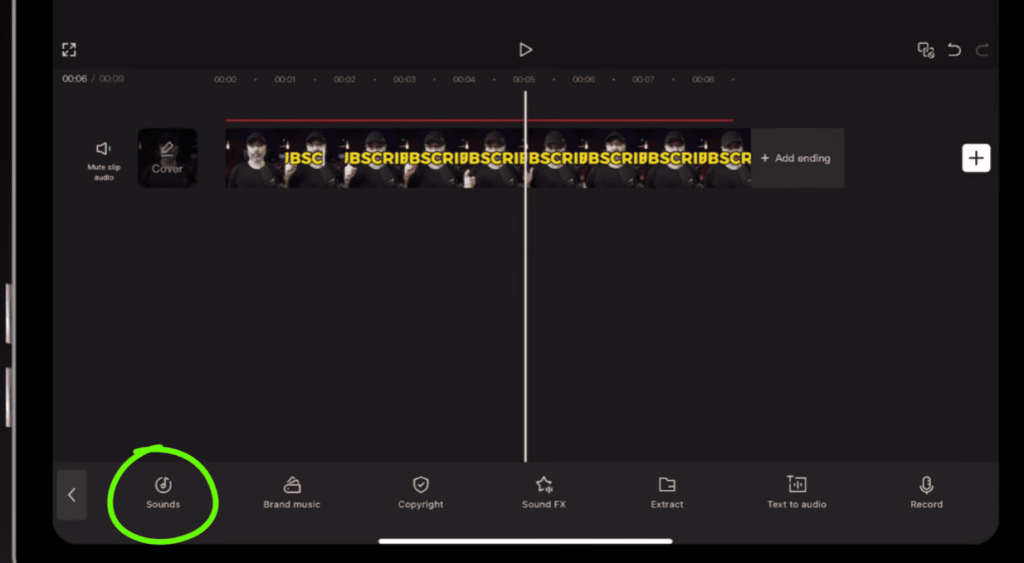
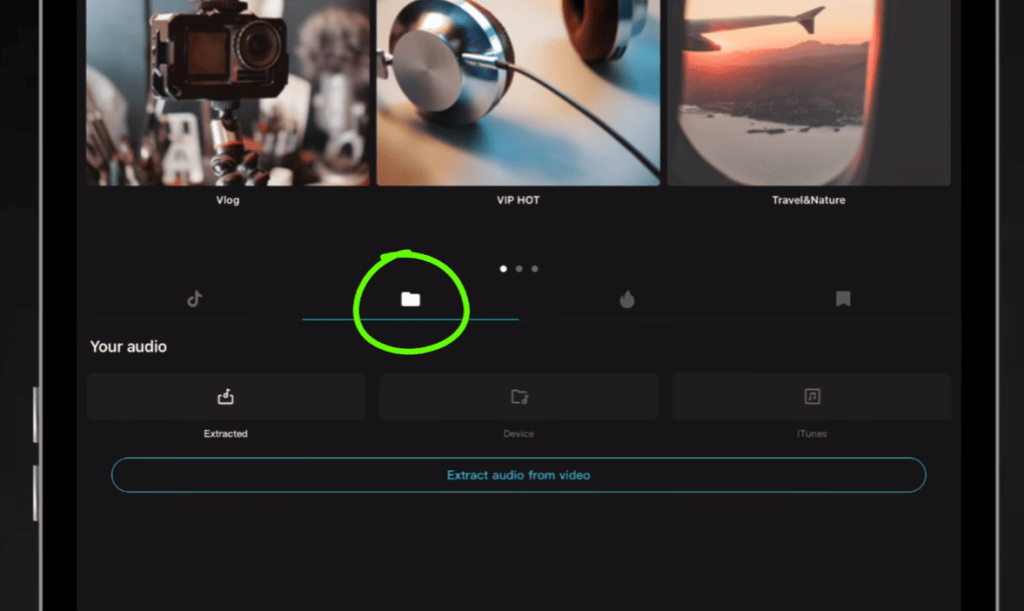
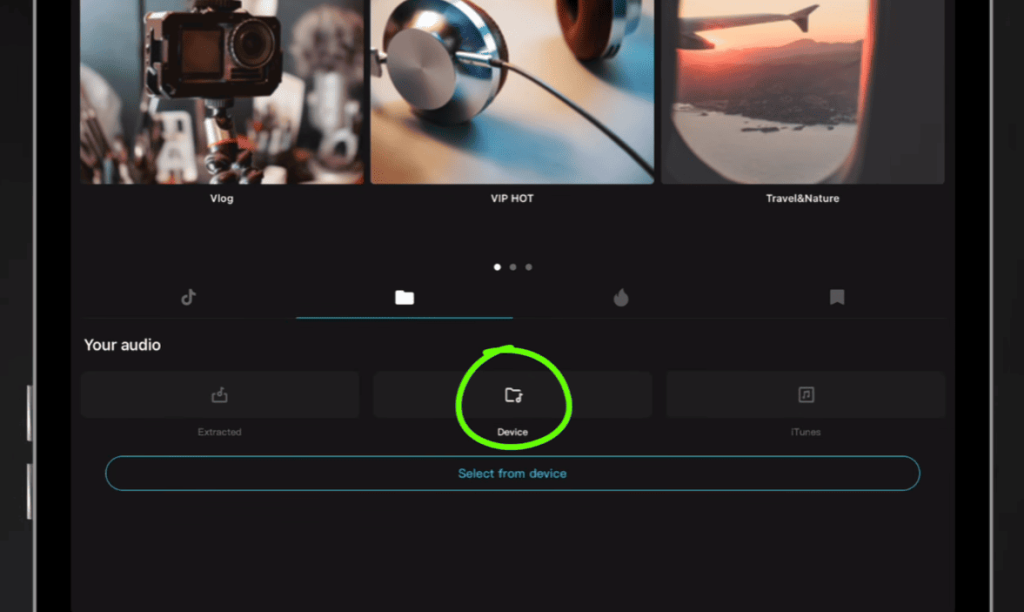
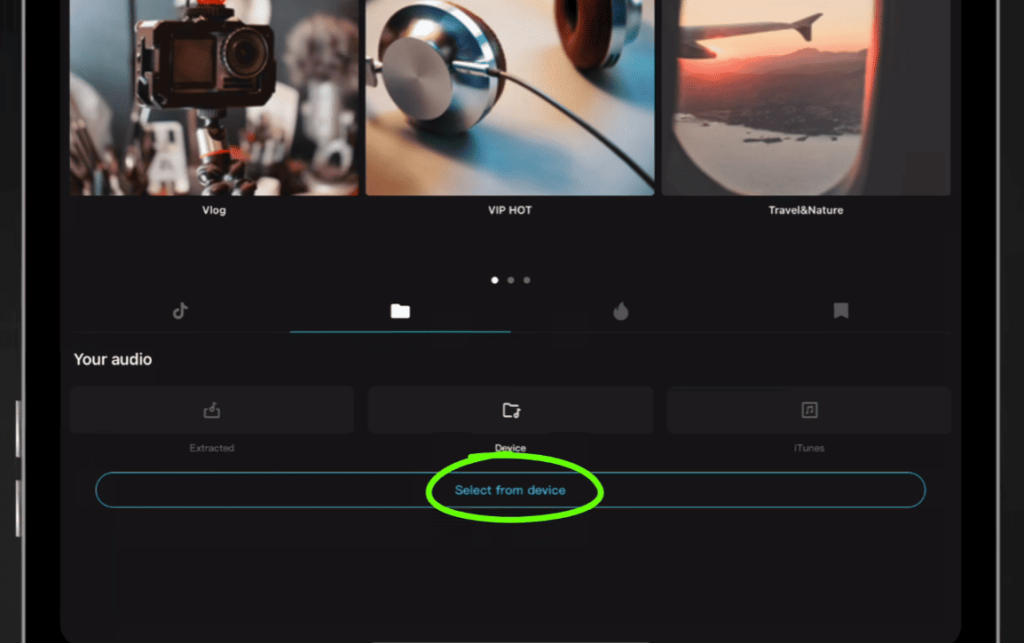
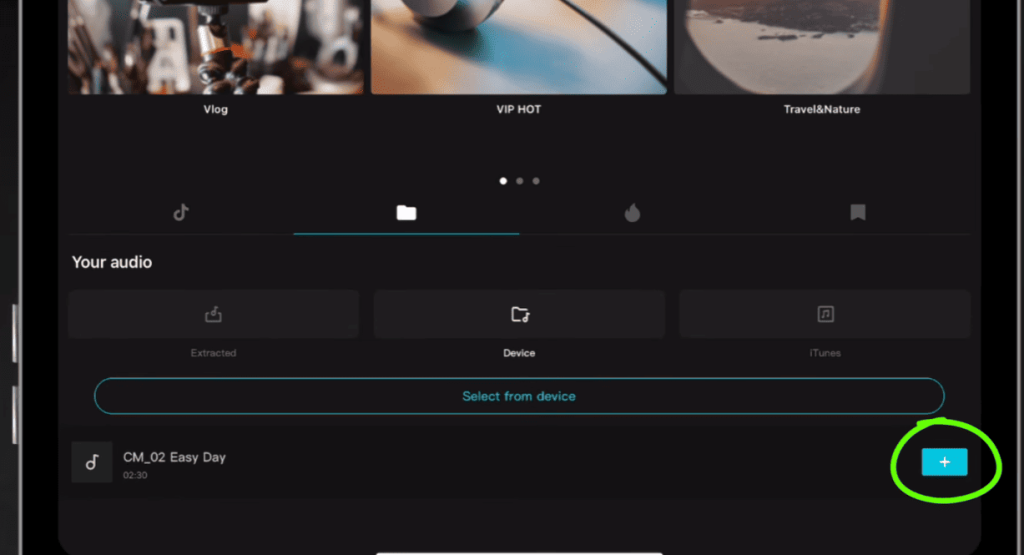
Adding music to CapCut is very simple. You can add background music from CapCut’s built-in music library or import your own audio files.
Follow these steps:
- Open CapCut and create a new project.
- Import the video clips you want to edit.
- Tap the Audio option in the editing menu.
- Select Sounds to browse CapCut’s music library.
- Choose a music track that matches your video style.
- Tap the +button to add the music to your timeline.
- Adjust the music length by trimming or moving the audio track.
- Change the volume to balance the music with other audio.
You can also use the audio editing tools in CapCut to adjust fade-in and fade-out effects, split music clips, or match background music with video transitions.
Avoid Choosing Music Only Because It Is Popular
While popular music can certainly attract attention, it may not be suitable for every video.
Popular songs may not fit your content style, the message you want to convey, or your target audience. Instead of blindly following trends, focus on whether music can enhance your video. When choosing audio, you can explore options like mp3 cap cut to find suitable tracks that match your video’s mood, pacing, and overall creative direction. The right music should support your story and help viewers connect with your content.
Excellent background music should complement the visuals. Ideally, the best choice is music that can powerfully support the narrative.
Tips for Finding the Perfect Music Faster
Choosing music can take time, especially when you have many options. These tips can make the process easier:
1. Preview Music With Your Video
A song may sound beautiful on its own, but when combined with your video clips, it may feel different. Be sure to test the music effects directly on the video timeline.
2. Focus on the First Few Seconds
For short videos, the opening is crucial. Please choose music that can quickly create the appropriate atmosphere.
3. Save Useful Tracks
If you frequently create videos, consider saving music styles that suit your content; this can speed up the editing process later.
4. Think About Your Audience
Consider your audience’s expectations for your content. Professional audiences may prefer simple background music, while entertainment content can utilize more creative sound effects.
Conclusion
Choosing the right music for a CapCut video is more than just finding a good song. The best background music should match the style of the video, effectively convey the video’s theme, and create the perfect atmosphere.
By defining the content type, matching the music to the video’s tone, adjusting the pacing, and utilizing CapCut’s audio tools, you can create more cohesive and engaging videos.
A well-chosen soundtrack can transform simple clips into memorable content, helping your videos leave a deeper impression on your audience.