

Whether you’re switching to a different video editing tool, concerned about privacy, or simply no longer need the platform,capcut account deletion is a straightforward process—if you know the right steps. In this guide, we’ll cover how to delete capcut account permanently on all devices, including a detailed walkthrough for how to delete capcut account on pc. We’ll also address critical considerations for users of capcut mod apk and capcut pro mod apk latest version. By the end, you’ll have all the information you need to make an informed decision about deleting your CapCut account.
Why Do Users Delete Their CapCut Accounts?
There are several reasons why users choose to remove their accounts:
- Privacy concerns
- Reducing unused online accounts
- Switching to another video editor
- Creating a new CapCut profile
- Managing multiple accounts
- Troubleshooting login or synchronization issues
Regardless of your reason, it’s important to understand that deleting your account may permanently remove access to your projects and cloud data.
Important Pre-Deletion Steps
Before you begin the capcut account deletion process, there are three crucial steps to protect your data and avoid unexpected charges:
- Backup All Your Projects:Deleting your CapCut account permanently erases all your data including cloud-stored videos, editing drafts, saved templates, and account settings. Export any important projects to your device or external storage before proceeding.
- Cancel CapCut Pro Subscriptions:If you’re paying for CapCut Pro, cancel your subscription first to avoid future charges. Account deletion does not automatically cancel recurring payments.
- Disconnect Linked Accounts:Unlink any connected social media accounts to prevent unintended data sharing after deletion.
How to Delete CapCut Account Permanently on Mobile
Follow these steps to delete your account using the official CapCut mobile app:
- Open the CapCut app and tap the Profile icon.
- Tap the Settings icon.
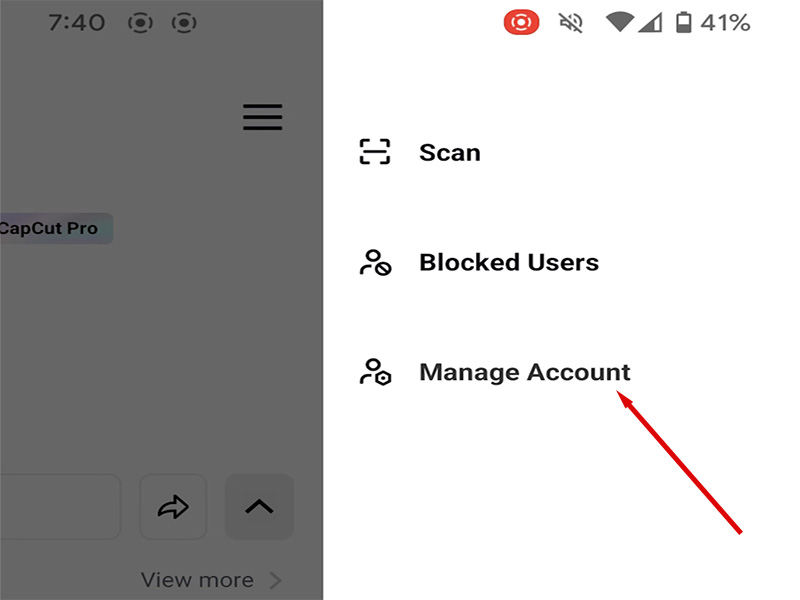
- Select Manage Account from the menu.
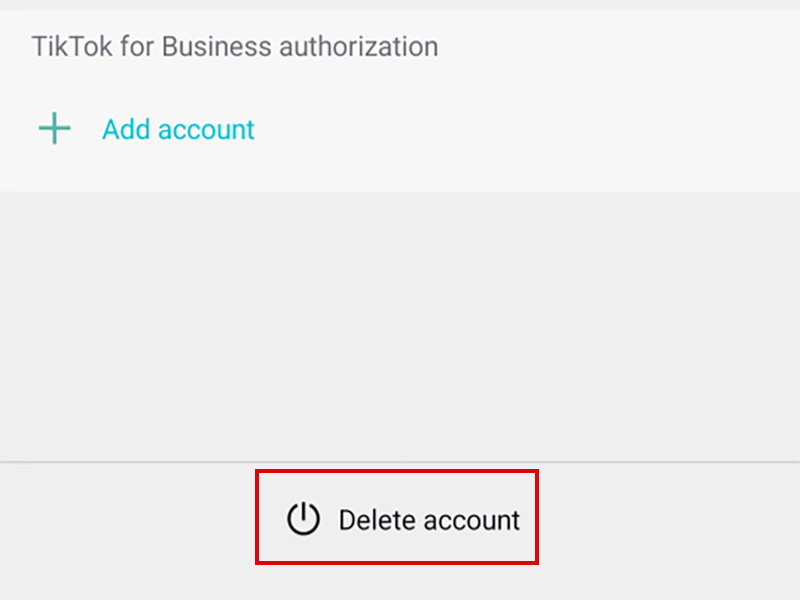
- Scroll to the bottom and tap Delete Account.
- Read the warning message carefully.
- Verify your identity via OTP or password.
- Confirm the deletion.. Your account will enter a 7-15 day waiting period before being permanently erased.
- Do NOT log in during the waiting period that will cancel the deletion process.
How to Delete CapCut Account on PC
For users wondering how to delete capcut account on pc, there are two methods: using the desktop app or the official website:
Method 1: Delete via CapCut PC Desktop App
- Launch the CapCut PC app and log in to your account.
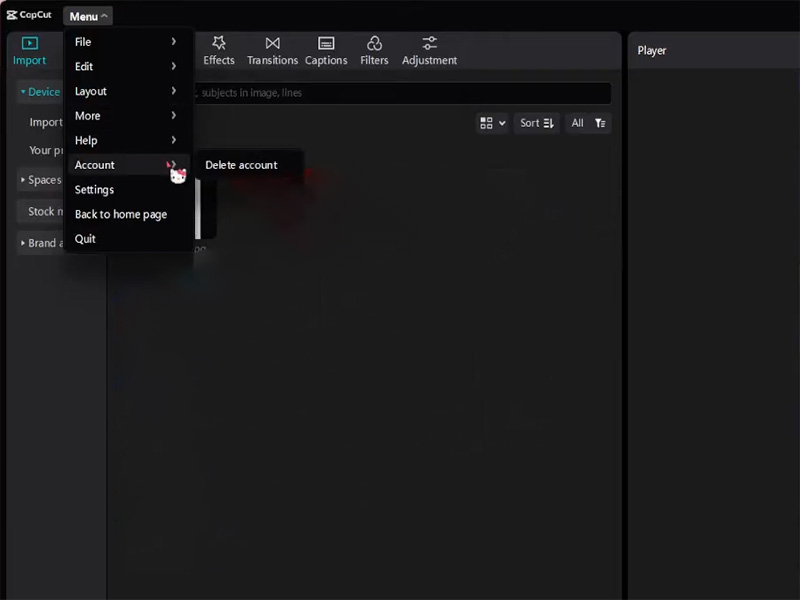
- Click the Menu button.
- Select Account from the dropdown menu.
- Look for the Delete Account option.
- Follow the on-screen prompts to verify your identity and confirm deletion.
Method 2: Delete via CapCut Official Website
- Open your browser and go to capcut official website.
- Log in to your account using your credentials.
- Click your Profile Icon.
- Select Settings from the dropdown menu.
- Navigate to the Privacy or Account Management section.
- Click Delete Account and complete the verification process.
How to Delete a CapCut Account Linked to TikTok
Many users sign in using their TikTok credentials.
If your account is linked to TikTok:
- Open CapCut settings.
- Locate connected account options.
- Review linked services.
- Unlink TikTok if necessary.
- Continue with the deletion request.
Be aware that unlinking and deleting accounts may affect synchronization between both platforms.
Common Problems During CapCut Account Deletion
Some users encounter difficulties when attempting to remove their accounts.
- Deletion Option Missing
Possible reasons include:
- Outdated app version
- Regional feature restrictions
- Temporary server issues
Updating the application often resolves this problem.
- Verification Code Not Arriving
Try:
- Checking spam folders
- Confirming email accuracy
- Verifying phone number settings
- Waiting a few minutes before requesting another code
- Active Subscription Warning
If you have an active premium plan, review billing settings before deleting the account to avoid confusion regarding subscription status.
What About CapCut Mod APK Users?
Some creators explore alternatives such as capcut pro mod apk latest version to access premium editing tools without purchasing a subscription.
Modified versions often have features such as:
- Premium effects unlocked
- Watermark-free exports
- Advanced transitions
- Additional templates
However, it’s important to understand both the advantages and potential drawbacks.
Potential Benefits
- Access to premium-style tools
- Expanded template libraries
- Advanced editing features
Potential Risks
- Security concerns from unofficial downloads
- Malware or unwanted software
- Lack of official updates
- Stability issues
Possible account restrictions if platform policies are violated
Users should carefully evaluate any third-party software before installation and prioritize device security.
Final Thoughts
Learning how to delete CapCut account is straightforward once you know where to find the account management settings. Whether you’re using mobile devices or searching for how to delete capcut account on pc, the process generally involves verifying your identity and submitting a deletion request.
Before you delete CapCut account permanently, remember to back up important projects, review subscriptions, and understand that some data may not be recoverable after deletion. If your goal is simply to explore different editing options, alternatives such as creating a new profile or testing tools like capcut mod apk and capcut pro mod apk latest version may be worth researching while carefully considering the associated security and account-related risks.
By preparing in advance, you can complete the account deletion process smoothly and avoid losing valuable content.


