Generate AI Viral Video in Minutes!

Generate AI Viral Video in Minutes!

CapCut vs. InShot: The Battle for the Ultimate Lifestyle Video Editor

CapCut vs. InShot

The explosion of short-form video content has turned every smartphone owner into a potential director. Whether you are capturing a weekend getaway for Instagram Reels or building a personal brand on TikTok, the software you choose acts as the bridge between raw footage and a polished narrative. In the mobile editing sphere, two names consistently rise to the top of the App Store charts: CapCut and InShot. While both applications serve the casual creator, they lean into very different user experiences. One is a trend-driven powerhouse built for the viral age, while the other is a reliable, classic tool focused on simplicity and versatility. Understanding the nuance between CapCut and InShot is essential for any creator looking to streamline their workflow without sacrificing quality.

The Power of the Ecosystem: Why CapCut is the Viral Engine

CapCut has rapidly become the gold standard for creators who live and breathe social media trends. Developed by ByteDance, the app enjoys a symbiotic relationship with TikTok that no other editor can replicate. This integration is its greatest competitive advantage. When a new transition or audio effect goes viral, it appears in CapCut almost instantly, often accompanied by a “use template” button that allows creators to jump on trends before they fade.
For the modern American creator, CapCut feels like an extension of the internet itself. It is packed with sophisticated, AI-driven features that were previously reserved for desktop professionals. From the “Auto-Velocity” tool that syncs clips to the beat of a song, to the impressively accurate “Auto-Captions” feature, CapCut is designed to do the heavy lifting for you. It isn’t just an editor; it’s a creative assistant. The workflow is fast, snappy, and rewards those who want their content to look “high-production” with minimal manual effort. If your goal is to make a video that looks like it belongs on the “For You Page,” CapCut provides the most direct route to that aesthetic.

greatest competitive advantage_

The Classic Contender: InShot’s Legacy of Simplicity

CapCut

While CapCut is the flashy newcomer, InShot is the seasoned veteran that has maintained a massive following through sheer reliability. InShot’s philosophy is rooted in a “no-nonsense” approach to editing. It was one of the first apps to master the art of the “canvas,” making it incredibly easy to take a vertical video and fit it into a square for an Instagram post or a horizontal frame for YouTube, often by adding stylish blurred backgrounds or solid colors.

InShot

InShot appeals to a different demographic: the lifestyle vlogger and the small business owner. These users don’t necessarily care about flashing neon transitions or AI face-swaps. They want a clean, stable interface where they can trim clips, add a nice filter, overlay some text, and move on with their day. One of InShot’s standout features is its integrated photo editor. Unlike CapCut, which is strictly video-focused, InShot allows you to create collages and edit still images within the same ecosystem. For a creator who manages a multifaceted social media presence, having a “Swiss Army Knife” app that handles both photos and videos is a massive time-saver. It’s an editor that feels like a comfortable pair of jeans—dependable, familiar, and effective.

Navigating the Interface: Automation vs. Manual Control

The divergence between these two apps becomes most apparent when you look at how a user actually interacts with the timeline. CapCut utilizes a multi-track editor that feels remarkably close to professional software like Final Cut Pro. It allows for complex layering, advanced masking, and precise keyframing. However, it manages to keep this complexity hidden under a very user-friendly surface. The “magnetic” timeline ensures that your clips stay aligned, which is a godsend for mobile users working on small screens.
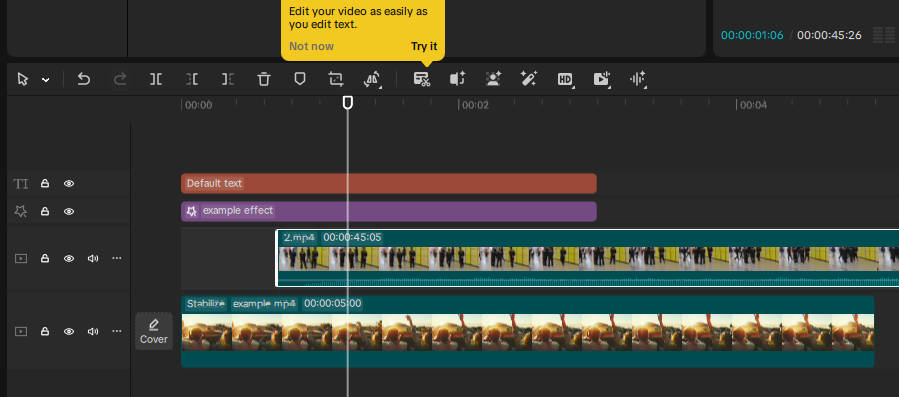
CapCut utilizes a multi-track editor

————————————————
InShot, on the other hand, keeps things linear. Its interface is arguably the most intuitive on the market. Everything is laid out in a single row of icons, making it virtually impossible to get “lost” in the app. This simplicity is a double-edged sword. While it makes InShot the perfect entry point for someone who has never edited a video before, it can feel restrictive for power users. InShot focuses on the fundamentals—speed, stickers, and music—without the overhead of complex layer management. For the American user who values a “get in and get out” workflow, InShot’s lack of clutter is its primary selling point.
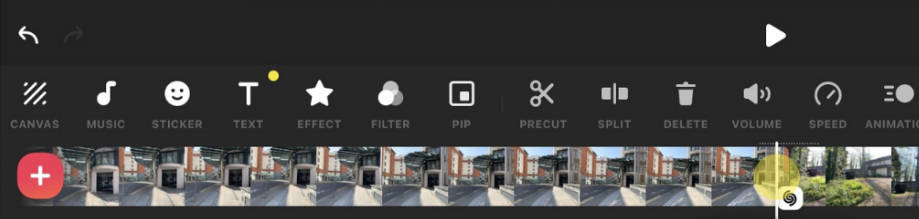
InShot things linear

Assets and Audio: The Battle for the Soundtrack

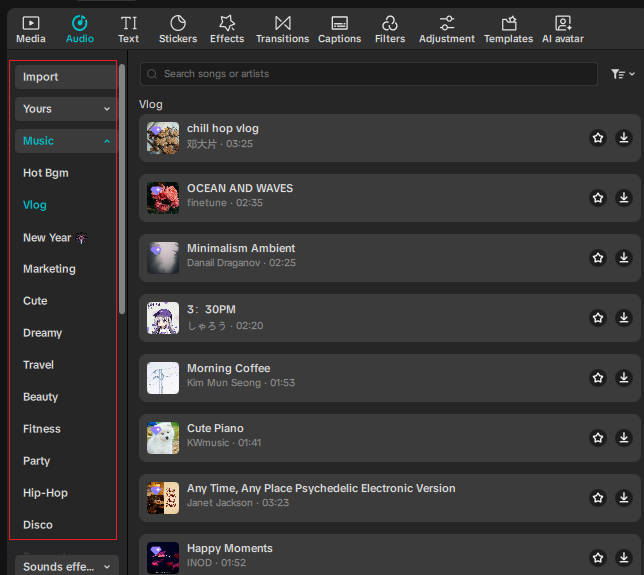
In the world of social media, audio is 50% of the experience. CapCut’s library is essentially the TikTok music library, giving you access to the latest hits and trending sounds without copyright headaches (within the platform). This is a massive draw for creators whose content relies on musical timing. Furthermore, its sound effect library is vast, featuring everything from “vine thuds” to cinematic ambient noises, all curated to fit modern meme culture.

————————————————
InShot takes a more traditional approach. It offers a solid selection of royalty-free tracks and the ability to extract audio from your own videos. While it might not have the “instant trend” access that CapCut boasts, its music selection often feels more evergreen and less “Gen Z-centric.” InShot also excels in the sticker and emoji department, offering a playful, aesthetic variety that fits the “lifestyle” and “vlog” vibe perfectly. It’s less about being “cool” and more about being “expressive.”

The Verdict: Selecting Your Creative Companion

Choosing between CapCut and InShot ultimately comes down to your creative intent and your final platform. If you are a social media native looking to build a following on TikTok or Reels, CapCut is the superior choice. Its AI tools, trend integration, and advanced layering capabilities make it the most powerful free editor available today. It is built for the fast-paced, high-energy world of modern video.
The debate shouldn’t be about which app wins, but rather which one fits your creative mood today. If you’re looking to capitalize on a trending TikTok sound or need AI to do the heavy lifting with captions and sync, CapCut is the clear frontrunner. It’s an aggressive, high-speed tool built for the viral age. However, for those moments when you just need to resize a video for a client, edit a clean vlog without the “Gen-Z” flair, or polish a photo on the fly, InShot’s reliability is hard to beat. In reality, most high-output creators don’t choose—they keep both in their arsenal. Use CapCut to catch the trend, and keep InShot for the everyday essentials.

Scroll to Top