
ByteDance officially introduced Seedance 2.5 on July 31, 2026. You don’t need a film crew. You don’t need a camera. You don’t even need editing experience. You only need two tools—Seedance 2.5 and CapCut—to edit and create viral videos.
Here you’ll find comprehensive information about Seedance 2.5, including prompts, pricing, the free Seedance 2.5 API, and the complete process for creating viral videos. If you want to learn about Seedance 2.5, this guide has everything you need.

What Is Seedance 2.5
Seedance 2.5 is a video generation model developed by ByteDance’s Seed team.
Most AI tools can only create simple movements from a picture. In contrast, Seedance 2.5 can expand the background to handle complex actions, like fight scenes or professional camera moves. That’s the big difference.
Older models broke character identity every few seconds. A jacket changed color. A face drifted. Lighting flipped. Seedance 2.5 fixes that.
– Longer video generation: It supports a single video generation of up to 30 seconds.
– Multimodal references: It can use images, video clips, audio, and written instructions together.
– Improved character consistency: Reference files help ensure that people or objects look the same throughout complicated scenes.
– Audio and video generation: It can generate synchronized audio alongside the visual content.
– Advanced editing: You can precisely change specific parts of a video using timestamps or reference guides for better control.
– Professional scene control: Use advanced features like green screens, 3D models, and specific camera directions to manage your scenes like a pro.
Seedance 2.0 vs Seedance 2.5: Is the Upgrade Worth It?
Seedance 2.0 was officially launched on February 12, 2026. You may have already experimented with Seedance 2.0. So, what’s actually different between the two versions?
| Feature | Seedance 2.0 | Seedance 2.5 |
| Max single clip | 15 seconds | 30 seconds |
| Image references | 9 images | 30 images |
| Video references | 3 clips | 10 clips |
| Audio references | 3 clips | 10 clips |
| Editing control | Basic extend | Timestamp editing, local edits |
| Language/dubbing | Major languages | 10+ languages, better lip-sync |
| Continuity | Good | Much stronger |
| Price tier | Cheaper | About 50% higher for API use |
In Seedance 2.0, you can provide reference images and instructions, then generate a short scene. In Seedance 2.5, the generated videos are more lifelike and can automatically grow your story. With just one sentence, you can make an interesting video up to 30 seconds long.
Seedance 2.0 was a clip machine. Seedance 2.5 is a director.
Does that mean everyone should abandon Seedance 2.0? Not necessarily.
If you’re creating a simple five-second animation, a basic visual experiment, or a quick transition, the older model may still be enough. There’s no reason to pay for more advanced generation when your project doesn’t need it.
Where to Access Seedance 2.5 API
You have several doors in. Pick based on your budget and skill level.
- CapCut / CapCut Web — Best for beginners
CapCut now ships an AI Video generator powered by the Seedance 2.5 API. You type a script, pick a style, and it generates scenes with avatars, voiceover, and music. Then you stay in the same app to edit.
- Jimeng — Best pure generation playground
ByteDance’s Jimeng app gives you Seedance 2.5 video generation plus daily login credits. Great for testing prompts without opening your wallet.
- Doubao — Easiest everyday option
Doubao’s pro video mode includes Seedance 2.5. Free users often get trial generations; heavier use needs membership.
- Volcengine API — Best for scale
If you want to build your own tool, bot, or batch pipeline, the API is live. Model ID: doubao-seedance-2-5-260628. It runs through Volcengine Ark.
How to Use Seedance 2.5
The easiest way to use Seedance 2.5 is through CapCut. Once your video is generated, you can use CapCut to fine-tune it or publish it directly to TikTok.
Step 1: Open CapCut
Open CapCut using the web, desktop, or mobile version available to you.
CapCut for PC also comes with Seedance 2.5 built-in, so there’s no need to use the web version.
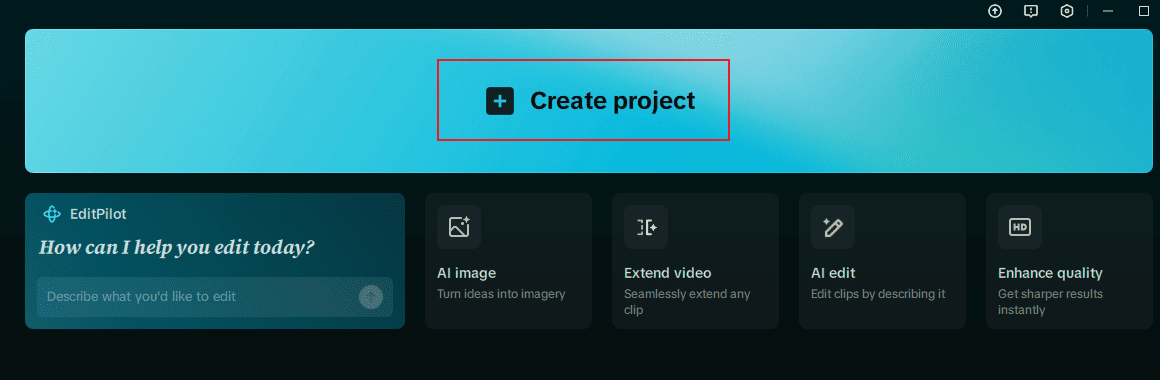
Step 2: Find the Seedance 2.5 Model
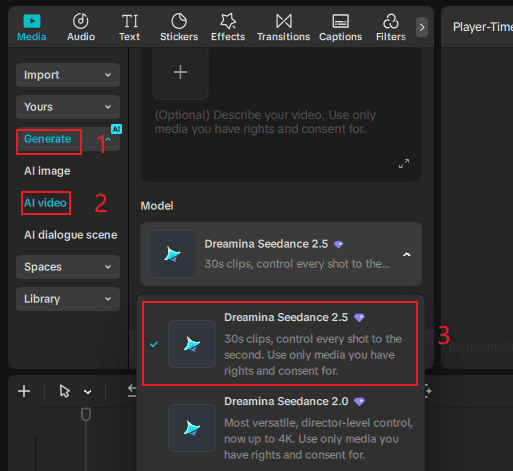
Click “Create project.” There is no need to import a video; instead, select Generate > AI video > Model and then choose “Dreamina Seedance 2.5.”
Step 3: Write a Detailed Seedance 2.5 Prompt
A useful Seedance 2.5 prompt usually contains six main elements:
| Prompt element | What to describe |
| Subject | Main character, animal, product, or object |
| Action | What the subject does |
| Environment | Location, background, and surrounding details |
| Camera | Shot type, movement, and perspective |
| Visual style | Lighting, colors, realism, or animation style |
| Audio | Dialogue, music direction, and environmental sounds |
Step 4: Build a Reference Kit
Seedance 2.5 loves references. You can upload up to:
- 30 images
- 10 video clips
- 10 audio files
But you don’t need all of them.
Step 5: Generate Inside CapCut
Settings I recommend for viral shorts:
- Aspect ratio: 9:16
- Duration: 30s for hero clips, 8–10s for tests
- Resolution: 720p to start, 1080p for final
- Frame rate: 24–30fps
Always generate a short test clip first.
Step 6: Extend and Fix, Don’t Regenerate Everything
Seedance 2.5 has two killer editing features:
- Video extension
If the story isn’t finished, extend the clip by another 4–30 seconds.
- Timestamp/local editing
If any parts need fixing, just provide the specific start and end times so the AI can make the changes for you.
Step 7: Move Into CapCut for Polish
Now open CapCut. Import your Seedance clip. You can perform “trim the fat,” auto-captions, micro-zoom, and color grading.
Step 8: Export
Is Seedance 2.5 Free? Understanding Credits, Subscriptions, and Pricing
The important thing is to understand that Seedance 2.5 doesn’t have one universal price across every platform.
Free-ish access
- Jimeng: daily login credits, enough for small tests
- Doubao: free generations per day for lightweight use
- Xiaoyunque / Trea: small daily quotas
How Much Does Seedance 2.5 Cost?
Official API pricing runs on tokens:
| Usage type | Price |
| Text/image-to-video (no video input) | ~¥70 / 1M tokens |
| With video input / editing | ~¥42 / 1M tokens |
| 1080p premium tier | slightly higher |
| Third-party resale (480p) | from ~$0.12/sec |
Practical translation:
- A 10-second test clip: cheap
- A 30-second hero clip: a few cents to a couple of dollars depending on platform
- Heavy experimenting: budget monthly credits, not pay-per-joy
Cheapest path for beginners
- Use Jimeng/Doubao free daily credits
- Test prompts at 5–8 seconds
- Only render final at 30s in 1080p
- Use CapCu’s free editor for finishing
FAQ About Seedance 2.5 and CapCut
Q: Can I really get unlimited Seedance 2.5?
A: Not sustainably. Promo events may offer temporary unlimited or zero-credit access, but normal plans are credit-based.
Q: Do I need coding for the Seedance 2.5 API skills?
A: Not to start. CapCut needs zero code.
Q: Do videos generated by Seedance 2.5 still require editing?
A: No. If you want your video to look better, you can try adjusting it to achieve the look you want.
Q: Is there an AI video generator better than Seedance 2.5?
A: There aren’t any at the moment. Seedance 2.5 delivers breathtaking results—it’s truly unprecedented. If a better AI video generator comes along, I’ll be sure to review it.
Download the latest version of CapCut Mod APK and try Seedance 2.5
Publication note: Product availability, credit allowances, subscription prices, and API rates can change by region and over time.