

If you’ve been struggling with CapCut download errors, regional restrictions, broken Microsoft Store installations, or endless “try again later” messages, there’s another solution many international users still don’t know about: Baidu Cloud.
Baidu Cloud offers massive cloud storage and reliable backup links. This guide will teach you how to download and register a Baidu Cloud account, and how to use it to download CapCut.
What Is Baidu Cloud?
Baidu Cloud, also known as Baidu Netdisk, is a Chinese cloud storage platform similar to Google Drive and OneDrive. Many users upload CapCut installers there because the files remain accessible even when official servers are restricted. While primarily a cloud storage service, Baidu Cloud has evolved into a comprehensive platform with AI-powered features that rival many creative tools.
How to Download Baidu Cloud International from Google Play?
Baidu Cloud officially opened registration for overseas mobile phone numbers on its overseas version on September 22nd, so you can download and use the Baidu Cloud app no matter where you are.
- Open Google Play Store: Find and open the Google Play Store app on your Android device.
- Search for “Baidu Cloud”: In the search bar, type “Baidu Cloud” Ensure you select the official version; the developer should be listed as “Baidu Cloud Storage Limited.”
- Identify the International Version: The international version will typically have an “International” identifier or a multilingual description.
- Download and Install: Click the “Install” button and wait for the download and installation to complete.
Note for iOS Users: If you use an iPhone or iPad, you can search for “Baidu Cloud” directly in your local App Store to download the overseas version.
System Requirements & Compatibility: Baidu Cloud International is compatible with Android 5.0+ and iOS 11.0+. It is recommended to keep your device’s operating system updated for a more stable experience and faster upload/download speeds.
Baidu Cloud Register — How to Create an Account
Registration with an Overseas Phone Number
Starting September 2025, Baidu Cloud International fully supports registration with overseas phone numbers on mobile devices. This is the most convenient method.
Registration Steps:
- Open the installed Baidu Cloud International app.
- Click the “Sign Up” or “Register” button.
- Select the “Register with phone number” option.
- Enter your international phone number, including the country code, e.g., +1 for USA, +81 for Japan.
- Wait to receive the SMS verification code, which usually arrives within 1-2 minutes
- Enter the verification code, then set your password and account information.
- Complete registration and log in.
Important Note: In some countries and regions, Baidu’s verification code SMS might be blocked by carrier firewalls, preventing delivery. If this happens, you can try the following:
- Ensure your phone number and country code are correct.
- Try resending the code at a different time.
- Use a VPN connected to a network node in mainland China.
- If you still cannot receive it, consider using the email registration method.
Email Registration
If you encounter issues with phone verification, email registration is a completely viable alternative.
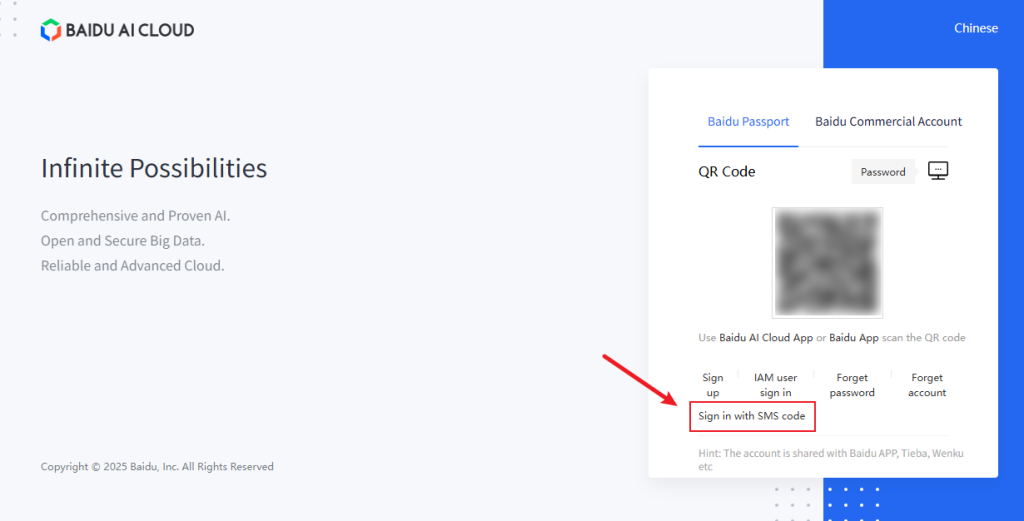
- Visit the Baidu account registration page: Search for “Baidu cloud login” to access the Baidu registration page.
- Switch to the “Sign in with SMS code” option.
- Enter your mobile phone number to get the verification code
- Enter a valid international email address, e.g., Gmail, Outlook.
- Set a secure password and fill in the CAPTCHA.
- Agree to the User Agreement and Privacy Policy.
- Click Register
- After successful registration, log in to Baidu Cloud using your email account.
Considerations: Some email services might not receive verification emails due to regional restrictions; you can use email addresses provided by Chinese email service providers, such as name@qq.com or name@163.com, etc.
If you have trouble registering, you can ask Baidu Cloud’s support team for help.
- Contact Email: baidudrive_global@baidu.com
How to Download CapCut Files from Baidu Netdisk?
Step 1: Open the shared CapCut link.
Step 2: Save the file to your cloud drive.
Step 3: Click the CapCut APK link and select Download.
Step 4: Once the download finishes, click the file on the Baidu Cloud download page and select Install. You may also be automatically taken to the installation screen.
Done! You can see the CapCut app on your phone’s home screen.
Core Feature Experience of Baidu Cloud International
File Management and Sharing
Baidu Cloud International allows users to upload big files and share folders. You can save your files online and easily reach or organize them from any location. Sharing files is now easier with automatic link generation. Once you have the link, simply open your cloud drive to view or save the file.
Seamless Multi-Platform Synchronization
The global version works on Windows, Mac, iOS, and Android, keeping all your devices synced. You can easily switch between your computer, phone, and tablet. Your files stay updated in less than five seconds, making it perfect for everyday work.
Intelligent Data Management
Baidu Cloud International does more than just store files; it also features smart search tools. You can easily find what you need by searching for titles, specific types of images, or even text found within pictures.
FAQ
Q: Is Baidu Netdisk safe?
A: Baidu Netdisk itself is legitimate and secure, but you need to ensure the security of the source files.
Q: What about the storage space for Baidu Cloud International?
A: Baidu Cloud offers free storage space, along with paid Super Member services. You start with 5GB of free storage. By participating in official promotional events, you can expand this capacity to 2TB. Furthermore, if you opt for a paid plan, you can access up to 16T of storage.
Q: How fast is Baidu Cloud International when used overseas?
A: Baidu Cloud International has deployed CDN nodes globally and uses efficient data transmission protocols to ensure users can quickly access and download files from anywhere.
Personal Experience and Final Recommendations
For many overseas users, Baidu Netdisk feels confusing at first simply because it’s less familiar than Google Drive or Dropbox.
Personally, one of the biggest advantages of Baidu Netdisk is how deeply integrated it is within Asian creator communities. A huge amount of editing resources, CapCut assets, templates, anime materials, and archived software versions are shared there long before they appear elsewhere.
The registration process can definitely feel frustrating for international users, especially when SMS verification fails. But once you complete the Baidu Cloud login process, the platform becomes much easier to use than many people expect.
If you regularly work with CapCut, short-form content, video editing assets, or large downloadable resources, learning to use Baidu Netdisk is genuinely worth it.


