

When you try recording a TikTok video or YouTube short for the first time, feeling nervous or awkward might cause you to look away, which can make you seem unsure of yourself.
Low confidence makes it hard to attract an audience and makes you look unprofessional. But maintaining a steady gaze is tough, so we need some outside help.
CapCut AI Eye Contact Correction offers a simple solution. In this guide, you’ll learn how to use eye contact correction in CapCut and alternative free eye contact correction tools.
What Is CapCut Eye Contact Correction
CapCut Eye Contact Correction is an AI video enhancement feature that detects your eyes and subtly changes their direction to create natural-looking eye contact with viewers.
Instead of re-recording an entire video because you occasionally looked away, the AI analyzes facial landmarks and adjusts eye movement frame by frame.
This feature is especially useful for Content creators, Online teachers, Business professionals, Influencers, etc.
The goal isn’t to create an artificial appearance. Instead, it helps improve audience engagement by making your gaze appear more focused and attentive.
How to Use Eye Contact Correction in CapCut
The process differs slightly between the mobile app and the desktop version.
On Mobile
- Create a New Project: Open the CapCut app and tap “New Project.”
- Import Your Video: Choose the video you want to fix from your gallery and put it on the timeline.
- Select the Clip: Tap the video clip in the timeline to open the edit menu at the bottom.
- Find the Eye Contact Tool: Swipe horizontally through the bottom editing toolbar. Find “Eye contact.”
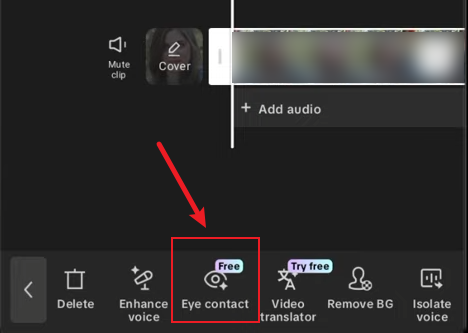
- Apply the Correction: Tap the “Eye Contact” button. The AI will process the clip.
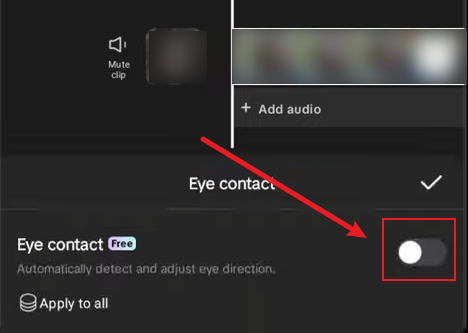
- Apply to all: If you want to apply the effect to other video clips, you can click “Apply to all“.
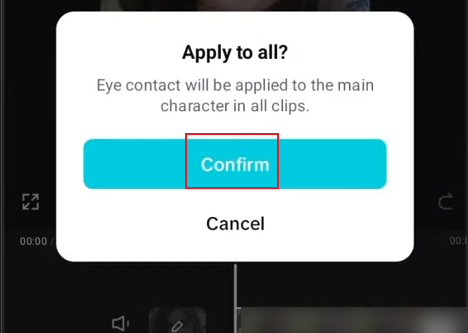
- Preview and Export: Play back the clip to see the result. If satisfied, proceed to export your video as usual.
On Desktop
- Launch and Import: Open CapCut on your computer and start a new project. Import your video file.
- Select the Clip: Click on the video clip in the timeline.
- Explore the Editing Panels: Click on the editing panel on the right, scroll down under “Video” > “Basic“, and find “Eye contact“.
- Click “Eye contact”: Capcut eye contact correction will be automatically applied to the entire video.
- Preview and Export: Play back the clip to see the result. If satisfied, proceed to export your video as usual.
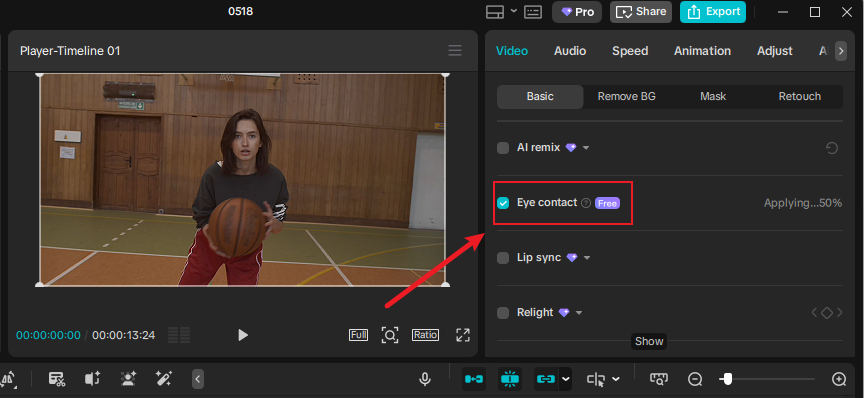
Is CapCut Eye Contact Correction Free
Yes, this feature is completely free. However, I’m not sure if you will need a subscription to use it later.
If you’re worried that this feature will require payment, you can consider using the CapCut Mod APK. It provides all the latest premium tools for free and is a great alternative.
As this feature is new, the effect is sometimes unstable; your eyes may appear to wander or flicker in some situations. For better results, you can use other tools.
AI gaze correction tool
- Descript: Great for long-form video creators, this tool offers easy text-based editing and an AI feature that maintains eye contact.
- Captions: Designed for mobile creators, this tool automatically corrects your eye contact to look straight at the camera.
- VEED.io: A great web-based solution with a dedicated “Magic Tools” section that automatically aligns your eyes to the camera.
- Async: It provides various editing tools, such as eye contact correction, and some online tools are also available.
- NVIDIA Broadcast: A free software application that uses real-time AI eye redirection. Live Video Calls & Interviews. You can read your notes on the screen while appearing to look straight at the camera.
- Media.io: Media.io’s AI Eye Contact Correction is an online photo tool that improves headshots by adjusting where the subject is looking.
FAQ
Q: Can eye contact correction fix every situation?
A: No. Extreme head turns, hidden eyes, and low-quality footage may limit effectiveness.
Q: Does the CapCut Eye Contact feature look natural?
A: It usually looks natural, but it might look a bit strange when you move or blink.
Q: I can’t find the Eye Contact option on my CapCut PC version.
A: Update CapCut to see if that fixes the issue. Usually, missing features mean your app needs an update.
Q: How well does CapCut’s eye contact tool work for videos with multiple people?
A: This tool works best for one person and is less effective for groups.
Final Thoughts
Eye contact correction helps video creators make their work look more professional and engaging without needing complex editing skills.
Although free eye contact correction alternatives exist, CapCut’s implementation strikes a good balance between simplicity, accessibility, and quality.
Eye contact correction isn’t a magic solution. To truly elevate the professionalism of your videos, you can also try reading the following guidelines:[[[


