
CapCut has become one of the most popular video editing applications thanks to its simple interface, powerful editing tools, and AI-based features. It is widely used on Android, iOS, Windows and macOS platforms. However, many Ubuntu users who want to edit videos often ask one question: Is CapCut compatible with Ubuntu?
In short, there is no official Ubuntu version of CapCut. Unlike Windows and macOS, Ubuntu users cannot directly install the native CapCut desktop application. However, users searching for capcut ubuntu can still find alternative ways to edit videos, including using the web-based editor, running Android-compatible solutions, or choosing other video editing tools that work well on Linux systems. These options allow Ubuntu users to access similar editing features without needing the official desktop app.
In previous guides, we shared ways to do text animations in CapCut PC. This article will introduce the availability of CapCut on Ubuntu, several possible ways to access its features, and what Ubuntu users should know before choosing a video editing method.

Does CapCut Have an Official Ubuntu Version
Currently, CapCut offers official desktop versions for Windows and macOS, as well as mobile apps for Android and iOS. However, there is no dedicated Linux or Ubuntu version.
The main reason is that most software companies focus on operating systems that have a wider desktop user base. Windows and macOS have a stronger presence in the desktop video editing field, while Linux distributions like Ubuntu are used more by developers, technical users, and the open-source community. Although linux ubuntu server is popular for hosting, development, and system management tasks, it is not the primary choice for mainstream desktop video editing, which makes companies less likely to create dedicated applications like CapCut for Ubuntu.
Because there are no official Ubuntu packages, users cannot download .deb files or install CapCut through the Ubuntu Software Center like they would install other Linux applications.
Can You Use CapCut Online on Ubuntu
The easiest way to use CapCut on an Ubuntu system is through the web version.
CapCut provides an online video editor that can be used directly in modern browsers. Ubuntu users can access the CapCut website using browsers such as Chrome or Firefox to edit videos without installing a desktop application.
The web version supports many common editing functions, including:
- Video trimming and cutting
- Adding music and sound effects
- Text and subtitles
- Filters and transitions
- Basic AI editing tools
- Cloud project storage
For users who only need simple editing, the browser version can provide an experience similar to that of a desktop application.
However, compared to a fully functional desktop editor, online editing relies more heavily on browser performance and network connectivity. Large video projects with lots of special effects may appear slower.
How to Run CapCut Android Version on Ubuntu
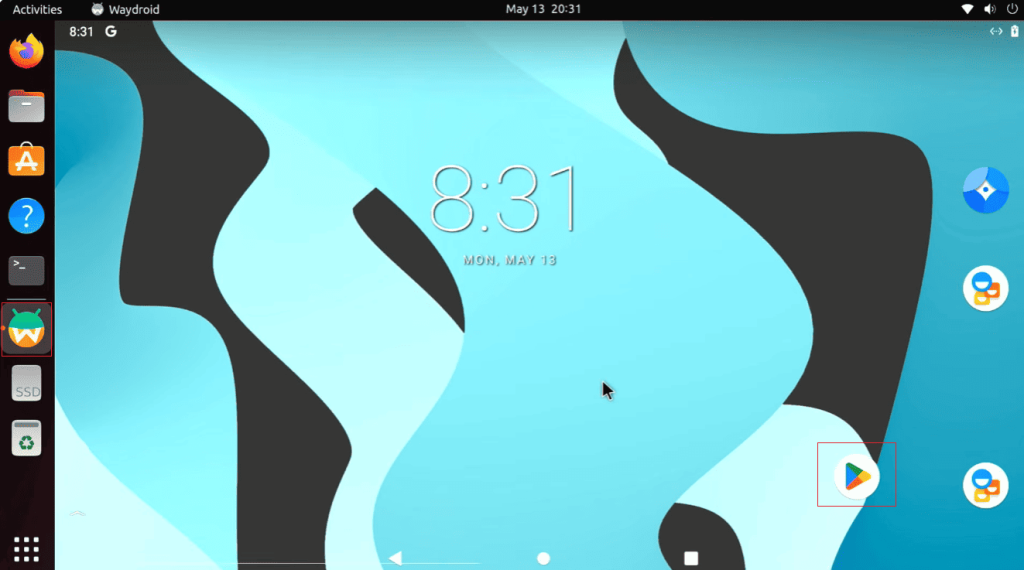
Because CapCut has an Android app, some Ubuntu users have tried running its mobile version using Android-compatible tools.
Android containers and emulators allow Android apps to run on Linux systems. After installing the appropriate Android environment, users may be able to install the CapCut mobile application.
This method can provide access to many mobile features, such as:
- Mobile editing tools
- Templates
- Stickers
- AI effects
- Short video creation features
However, the experience of using CapCut on a computer may differ from that on a mobile phone. The app is designed for touchscreens, so using a mouse and keyboard may feel less natural.
Performance also depends on the computer hardware and the Android system environment used.
Can CapCut Run Through Wine on Ubuntu
Wine is a compatibility layer that allows some Windows applications to run on Linux systems. Some Ubuntu users may consider using Wine to install the Windows version of CapCut.
In theory, Wine can run many Windows programs, even if you set up your environment on a clean system via an Ubuntu server download. However, video editing software typically relies on complex system components, graphics support, and hardware acceleration features.
Because CapCut is a modern video editor with advanced graphics features, its user experience may differ from the official Windows version.
Users who want a stable editing workflow usually choose browser-based CapCut or native Linux editing software.
Best CapCut Alternatives for Ubuntu
Although CapCut is not officially available for Ubuntu, Linux users have several powerful video editing alternatives.
| Video Editor | Main Features | Best For |
| Kdenlive | Multi-track editing, effects, transitions | Professional editing |
| Shotcut | Simple interface, wide format support | Beginners |
| OpenShot | Easy timeline editing | Basic video projects |
| DaVinci Resolve | Advanced color grading and professional tools | High-quality production |
| Blender | Video editing and 3D features | Advanced creators |
These applications are designed for Linux and generally offer better system integration than trying to run the mobile or Windows version of CapCut.
CapCut Web vs Ubuntu Video Editors
For Ubuntu users, the choice between CapCut Web and Linux video editors depends on individual needs.
| Feature | CapCut Web | Ubuntu Editors |
| Installation | No installation needed | Usually requires installation |
| Templates | Large template library | Depends on software |
| AI tools | More AI-based features | Fewer AI functions |
| Offline editing | Limited | Better support |
| Linux support | Browser-based only | Native support |
| Professional tools | Basic to medium | Medium to advanced |
CapCut Web is suitable for users who enjoy quick editing, creating social media videos, and using ready-made templates. For users who need complete control over video projects, a Linux editor is more suitable.
Why Do Ubuntu Users Want CapCut
Many Ubuntu users are interested in CapCut because it has some features that appeal to content creators.
Simple Editing Process
CapCut is known for its beginner-friendly design. Users can quickly edit video clips, add effects, and create short videos without needing to learn complex editing software.
Large Template Collection
Templates are one of CapCut’s most popular features. Users can create videos by replacing video clips and photos without having to manually build each effect.
AI Editing Features
CapCut has built-in AI tools to help with tasks such as automatically adding captions, removing backgrounds, and intelligent video adjustments. These features can help creators who frequently produce content save time.
Social Media Support
CapCut is perfect for short video platforms. Many users choose it because its editing style is a perfect fit for modern social media content.
How to Choose the Right Editing Method on Ubuntu
The best way to use CapCut or similar tools depends on the type of videos you create.
For Short Social Media Videos
CapCut Web is usually the simplest option. It provides quick access to templates, effects, and basic editing functions.
For YouTube Videos
A Linux video editor might be better, as longer videos often require more timeline control, audio adjustments, and file management.
For Professional Projects
Advanced editors such as DaVinci Resolve or Blender may offer more tools for detailed editing, color work, and visual effects.
Will CapCut Release an Ubuntu Version
There has been no official announcement yet regarding the CapCut Ubuntu-specific version.
Linux support depends on many factors, including user needs, development costs, and technical requirements. Because Ubuntu users represent a much smaller share of the desktop market than Windows and macOS users, businesses typically prioritize other platforms.
However, the increasing popularity of web applications has made it easier for Linux users to access tools that previously required native desktop versions.
Final Thoughts
So, does CapCut support Ubuntu? There is currently no official desktop version for Ubuntu. However, Ubuntu users can still access it through CapCut’s web-based editor or explore other Android-compatible solutions.
For quick editing, social media videos, and template-based projects, CapCut Web is a practical choice, for users who want a complete Linux editing workflow, applications such as Kdenlive, Shotcut, OpenShot, or DaVinci Resolve offer powerful alternatives.
Although CapCut on Ubuntu is not available as native software, Linux users still have many ways to create high-quality videos. The best choice depends on whether you value CapCut’s AI features and templates more, or prefer a native video editing experience.